Black & White C-Gear, local trading, Entralink and Poké Transfer
Which original BW cartridge connections still work locally, how to trade and transfer, and which official online services ended.
Original Black and White; their sequels have different routes and encounter availability.
Pictures for this guide


C-Gear unlock and its three connection paths
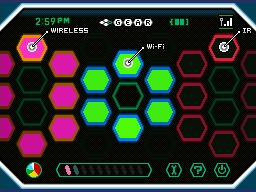
Fennel gives the C-Gear after the first Gym and Dreamyard task. Its bottom-screen interface separates infrared, local wireless and the online connection. Those labels matter today: a nearby local trade is different from connecting to the former Nintendo Wi-Fi Connection servers. Turn the C-Gear on when you intend to use a nearby multiplayer feature.
C-Gear communications consume extra battery and can prevent the usual closed-system sleep behaviour. Charge both systems before a long exchange. The main adventure, NPC trades, Day Care and wild catches do not need an online account. Missing internet servers do not erase the cartridge’s local communication features.
Current availability: local functions and ended services
| Feature | Connection | Availability |
|---|---|---|
| Nearby Union Room battle / trade | Local DS wireless | Works with compatible games and hardware; no official internet server required. |
| C-Gear infrared battle / trade / Feeling Check | Nearby cartridge infrared | Local feature; keep the systems and cartridges appropriately aligned. |
| Original Entralink missions and resident recruitment | Local DS wireless | Local feature when another compatible original save is present. |
| Route 15 Poké Transfer | Local DS Download Play | Works with two systems, suitable Generation IV game and eligible Pokémon. |
| Relocator event transfer | Local DS Download Play | Local feature, but requires an existing eligible historical event Pokémon. |
| GTS, GTS Negotiations, Random Matchup and Wi-Fi Club | Nintendo Wi-Fi Connection | Official service ended 20 May 2014. |
| Dream World, Game Sync and Generation V Global Link customization | Generation V Pokémon Global Link | Official service ended 14 January 2014. |
These dates describe the official services. A surviving menu option is not evidence that the original server remains active. A fresh save cannot download new Dream World encounters or receive a retired online event simply by retrying the same connection. The Nintendo termination notice explicitly distinguishes internet functions from offline and local features.
Perform a nearby Generation V trade
- Prepare two compatible Generation V games on two systems. Save both games and make sure each has a Pokémon available to exchange.
- For local wireless, both players enter the Union Room through the Pokémon Center upstairs receptionist and select the trade interaction with the nearby player.
- For C-Gear infrared, choose the same infrared trade option and face the systems toward one another; the infrared hardware is in the compatible game cards.
- Inspect the offered species, held item and nickname before confirming the exchange. Keep both systems powered until the trade and saving sequence finish.
- For trade evolutions, remove Everstone and equip any required trade-held item beforehand. Return borrowed Pokémon in a second exchange when agreed.
Black and White can trade with Black 2 and White 2 for supported Pokémon and forms. A sequel-only fused or special form does not make every sequel feature compatible with the originals. Generation IV games cannot join a normal Generation V trade; use the separate one-way transfer system. A traded Pokémon also retains its original Trainer identity and can be subject to obedience limits.
Entralink missions, Pass Powers and resident recruitment
Use the C-Gear’s Wireless menu outside an eligible building or restricted area to warp to Entralink. A visiting player crosses an Entralink bridge to connect to a nearby host whose C-Gear is on and who is in an eligible northern Unova area. Visiting another world changes its appearance to monochrome. The host and visitor need different roles; two players both standing in their own Entralink are not a useful host setup.
The Entree offers missions with stated time limits and conditions. Completing them earns Pass Orbs and raises Entree levels, unlocking additional Pass Powers. Powers can assist experience, hatching, friendship, shopping or catching according to the selected effect. Speak to eligible residents in another player’s Black City or White Forest when recruiting population for your own corresponding area.
The originals’ support missions are different from the sequels’ Funfest system. Mission descriptions and host location are the useful checks when a local connection does not appear. Entralink is not a way to enter another player’s world remotely over the old GTS menu.
Dream World and Pokémon already in the Entree Forest
Dream World historically used the Pokémon Global Link website and Game Sync to send selected befriended Pokémon and items back to a save. The returned Pokémon appeared in the save’s Entree Forest, often with Hidden Abilities. That web service is closed, so new befriending trips and new server-delivered rewards are unavailable through the official route.
Pokémon already delivered to the cartridge’s Entree Forest remain a different case: interact with the stored Pokémon in your own forest and catch it there. A visitor cannot take Pokémon from another player’s forest. Existing legitimately obtained Hidden Ability females can also supply further offspring through the correct local breeding rules. The closure blocks new server delivery rather than converting already caught Pokémon into unusable data.
Poké Transfer: Generation IV into Black or White
After the main story and the National Pokédex, visit the Poké Transfer Lab on Route 15. Use one system running Black or White and a second system holding Diamond, Pearl, Platinum, HeartGold or SoulSilver. Start the laboratory connection and use DS Download Play on the older game’s system. The source and destination games must be the same language for this direct transfer.
Choose six eligible Pokémon from the older game’s PC, then play the catching minigame. Successfully caught targets move into the Generation V save; targets missed before the time limit remain in the source game and can be attempted again. There is no Pal Park-style daily six-Pokémon limit. The transfer is one way: a Pokémon that arrives in Generation V cannot be sent back to a Generation IV cartridge.
Transfer restrictions and preparing the older cartridge
| Restriction | Preparation |
|---|---|
| No Eggs | Hatch the Egg first. |
| No Spiky-eared Pichu | This special Pichu remains in its original HeartGold / SoulSilver save. |
| No moves designated as HMs by the source game | Visit the source game’s Move Deleter before selection. Defog and Whirlpool differ between the source games’ HM lists. |
| No carried held items | Remove them beforehand or allow the transfer process to return them to the source Bag. |
| No direct return journey | Keep another specimen or breed a spare in the older save if you still need that species there. |
| Event activation requires care | Use the intended Relocator path for eligible Celebi or shiny movie-event beasts before their original BW unlock. |
Poké Transfer does not carry an entire Bag, an unused fossil item or an event key item over with an ordinary Pokémon. Catch or revive a desired species in the older game first, then transfer the actual Pokémon. Trading within Generation V is a separate operation and can move permitted held items between those Generation V games.
Relocator: the limited early event-transfer feature
In Castelia’s northern street building, speak to the scientist and enter the English-version phrases EVERYONE HAPPY, then SIMPLE CONNECTION. This adds Relocator to the title menu before the post-story Poké Transfer Lab is available. Use two systems and DS Download Play with the eligible event Pokémon stored on the Generation IV cartridge.
Relocator is limited to qualifying historical Celebi and shiny event Raikou, Entei or Suicune, together with the coded Lock Capsule capability. It does not accept any ordinary Pokémon of those species and does not replace the general laboratory transfer. The unused eligible Celebi can activate Zorua’s Castelia gift, and an eligible movie-event beast can activate the Lostlorn Zoroark encounter. The Lock Capsule was never officially distributed, so its coded TM95 reward is not a normally obtainable extra objective.
Troubleshoot the right connection
For a nearby trade, check that both players selected the local path, both cartridges support the action, the systems are close enough and the game saves have reached the required access. For infrared, align the game-card infrared connection and choose the same action. For Entralink, place the host in an eligible outside area. For Poké Transfer, check game language, source PC membership, HM moves and transfer exclusions.
An old Wi-Fi menu error cannot be solved by moving two local systems closer together; it is a different feature with an ended official service. Keep the collection plan focused on local catches, breeding, NPC trades and compatible exchanges that the available games can actually perform. Preserve rare event specimens’ details before moving them, since transfer and event use can change how they are recorded.
Choose local wireless or infrared for nearby trades; check language, HMs and the one-way restriction before Generation IV transfer.
References
- Nintendo — original Pokémon Black instruction booklet
- Nintendo — official Wi-Fi termination notice
- Bulbapedia — Pokémon Global Link
- Bulbapedia — Pokémon Dream World
- Serebii — original Black and White cgear
- Serebii — original Black and White entralink
- Serebii — original Black and White pokeshifter
- Bulbapedia — Poké Transfer
- Serebii — original Black and White relocator
- Bulbapedia — Lock Capsule