Phantom Hourglass beginner guide: stylus controls and map notes
Learn touch movement, sword gestures and the DS map notebook.
Edition covered
Original Nintendo DS adventure. Wii U Virtual Console controls and online service availability are outside these guides.
Use the stylus deliberately
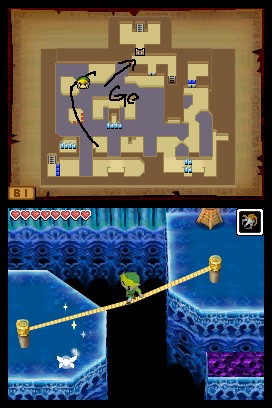
Touch movement and attacks share the lower screen. Move into a clear position before tapping an enemy, and avoid frantic gestures near ledges or hazards.
| Input idea | Action | Use |
|---|---|---|
| Touch destination | Move Link | Choose a clear route. |
| Tap an enemy | Targeted attack | Close enough to strike safely. |
| Draw a slash | Sword swing | Cut nearby obstacles or foes. |
| Draw a tool path | Boomerang route | Connect targets in the intended order. |
Use the map as your notebook
Copy an important symbol, route or ordered clue where it will be useful later. A map mark is a personal note; it does not automatically activate a mechanism.
| Clue | What to record | Why |
|---|---|---|
| Ordered switches | Numbers beside positions | Preserves the activation sequence. |
| Island clue | Symbol near its location | Connects dialogue to a place. |
| Temple route | Safe path and stopping points | Reduces hesitation on a return. |
| Blocked passage | Tool or obstacle reminder | Gives the next visit a purpose. |
Observe both screens
The upper screen often carries the map or a boss clue while the lower screen handles action. Check both before assuming an enemy is invulnerable.
Practice before a timed room
The early islands offer room to learn drawing and movement. A clean boomerang path or predictable roll is more useful than rushing a gesture under temple pressure.
The upper screen often carries the map or a boss clue while the lower screen handles action. Check both before assuming an enemy is invulnerable.
References
| Reference | Website |
|---|---|
| Nintendo: Phantom Hourglass booklet | m1.nintendo.net |
| Zelda Dungeon: Phantom Hourglass walkthrough | www.zeldadungeon.net |