Mario vs. Donkey Kong 2: March of the Minis Touch controls and routes: taps, swipes and Color Blocks
Learn the DS controls and prepare a room before its timer starts.
Edition covered
Original 2006 Nintendo DS game. Excludes Minis March Again!, Mini-Land Mayhem! and the GBA game’s direct Mario controls. Original Nintendo Wi-Fi Connection sharing is a discontinued historical feature.
Survey before activating a Mini
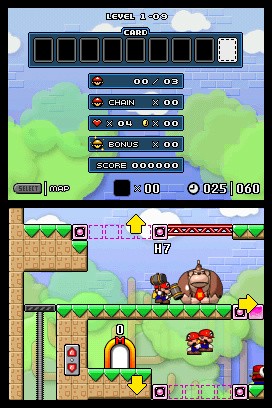
The room can be inspected before its clock starts. Find the exit, card, coins and hazards, then decide where Color Blocks must be moved; picking up blocks also starts the timer.
| Input | Action | Use |
|---|---|---|
| Tap an inactive Mini | Start moving | Begin the route |
| Tap a moving Mini | Stop it | Wait for a safe opening |
| Swipe left or right | Set direction | Redirect a toy or group |
| Swipe upward | Jump | Cross a gap or reach a platform |
| Swipe downward above a pipe | Enter the pipe | Follow a vertical connection |
Tapping and swiping perform different actions
A tap starts or stops a Mini. A directional swipe changes its direction, while an upward swipe makes it jump. Avoid stopping a toy accidentally when trying to redirect it.
| Object | What can change | Route check |
|---|---|---|
| Color Blocks | Removed and placed elsewhere | Inventory must cover the needed bridge |
| Elevator | Raised or lowered with its buttons | Wait until the platform is aligned |
| Conveyor switch | Belt direction | Watch every Mini on the belt |
| Sliding door | Open or closed passage | Avoid releasing a toy toward a hazard |
| Rotating pipe | Connection direction | Confirm the exit before sending a Mini |
Color Blocks are a shared room resource
Removed blocks return to the inventory shown on the upper screen. Move them from a wall that is no longer needed to a bridge or floor that protects the next part of the route.
Check moving toys after each environmental change
Changing a conveyor or opening a sliding door can release several Minis at once. Follow their positions rather than concentrating only on the one beside the stylus.
References
| Reference | Website |
|---|---|
| Nintendo game information or original manual | www.nintendo.com |
| Original-edition mechanics and reference | www.mariowiki.com |