Fallout 3 V.A.T.S. guide: hit chance, Action Points and limb targeting
Choose reliable queued attacks and understand when to return to ordinary combat to recover Action Points.
Original 2008 Fallout 3 base campaign with official patches. Broken Steel, other DLC, mods and mechanics from New Vegas or Fallout 4 are outside this guide. Pictures come from the original Fallout 3 Steam listing.
Pause and compare the displayed chances
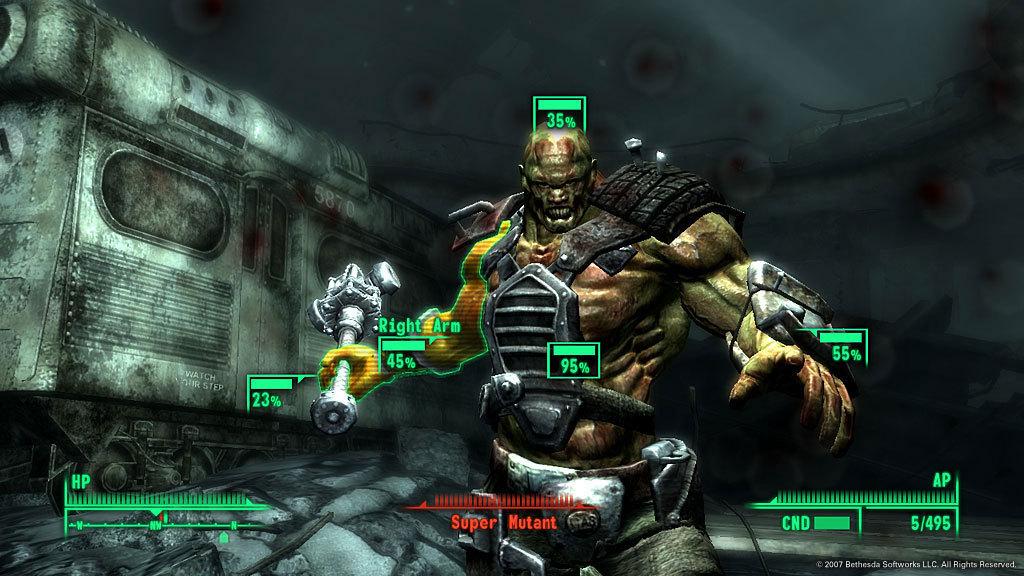
V.A.T.S. pauses the action while you select a target and body part. The percentage is a hit chance, not a promise or the amount of damage dealt. Compare the torso and limbs before spending the whole queue on a distant head. A closer position or a clearer line of sight can make the next V.A.T.S. attempt much more useful.
Spend Action Points on a realistic queue
Each selected attack costs Action Points, and the weapon affects how much of the bar a shot consumes. Agility contributes to the available AP pool. Queue attacks you can afford, confirm them, then return to ordinary movement and combat as AP recovers. Repeatedly opening the menu with an empty bar does not create another free sequence of shots.
Target limbs for a purpose
Crippling legs can slow a pursuer; damaging an arm can disrupt an armed opponent. A head shot can be attractive, but its lower percentage may waste ammunition when the immediate goal is simply to stop an enemy reaching you. Choose the body part that solves the current danger and check the target’s remaining condition before committing several attacks.
Improve the next attack outside the menu
Move out of obstructed angles, reload and maintain the weapon before using V.A.T.S. again. Relevant weapon skill and condition affect combat effectiveness, so targeting cannot compensate for every neglected part of the build. Use a short queue to test an uncertain position. This guide covers Fallout 3’s pause-and-queue system, not Fallout 4’s slow-motion implementation.
If every percentage is poor, cancel and reposition instead of spending the entire AP bar to discover that the shot was obstructed.
Picture details
Game artwork belongs to its respective rights holders.